







| Available learning itineraries: | Self-Study Course |
| Tutored Courses | |
| 1to1 Private Lessons | |
| Compare our Courses and prices | |
| Features: | 60 online Lessons with access 24 hours a day from all over the world |
| pronunciation guides and voice recording | |
| more than 1,000 audio files | |
| videos | |
| fun-learning Activities | |
| progress reports | |
| exercises and exams | |
| more than 3,000 words used in the lessons and listed in the glossary | |
| easy-to-understand grammatical explanations | |
| Ask-the-Prof-Service (so you will never feel lost during your Italian studies) | |
| virtual community | |
| forums | |
| highly qualified teachers | |
| Certifications: | CyberItalian Certificate of Participation after successful completion of each Standard, Intensive and Extended Tutored Course |
| Final Report and grades after successful completion of each Tutored Course for high school and university students. |
| Testimonial: "I have been a subscriber for two years and benefit from your timely format and informative links. I continue to learn Italian and depend on your site for help and guidance as well as current information about things Italian. Grazie. Vito" see more testimonials |

There is no average time for learning a language because it always depends on the needs and will of the student. Each of us has a different learning and acquisition time.
Each of our online lessons provides enough material to practice and study for about 3/4 hours or more. The successful completion of each Self-Study Course level (Beginner, Intermediate or Advanced) should take you from 30 to 40 hours. We recommend that you complete each Self-Study Course level in about 2 and half months (and no more than 3-4 months) to avoid long breaks between the lessons. This means studying about 1 lesson per week (including all the activities, practice, audio listening, pronunciation practice and recording, grammar studies and exercises). Some lessons may take you a little longer than others.
The Tutored Courses last 8 weeks (standard course), 6 weeks (intensive course) or 12 weeks (extented course):
- Standard 8 Weeks - practice from 3 to 5 hours per week
- Intensive 6 Weeks - practice from 6 to 10 hours per week
- Extended 12 Weeks - practice from 3 to 5 hours per week
The 1to1 Private lessons (for individuals or groups up to 6 people) are geared toward the educational needs of the student/s and it is up to the student/s to decide when they want to start or stop their personalized instruction. A teacher is always available to advise the student/s about their educational goals, to assess the progress and to discuss the structure of their studies. The minimum recommended time for the Private Lessons is 6 hours (a 6 lessons package).
PLEASE NOTE: If you are looking for a course for middle or high school students click here.
| Testimonial: "The site pleasantly surprised me, it is very complete in its different approaches to language learning. The inclusion of a wide range of subjects makes it very interesting and fun too; and the extra activities are a great way to reinforce what you have just learned." see more testimonials |
CyberItalian professors and teachers are native speakers of Italian, with an Italian university B.A. or B.A. and M.A., highly qualified professionals dedicated to the promotion of the Italian language and culture.
If you have any doubt or questions regarding your studies, you are not alone!
With CyberItalian you have many ways to contact a professor or teacher, ask questions, and find the answers to your questions.
You can contact a teacher via real-time chat, dedicated forums, or e-mail.

Pinocchio is a character created in 1881 by Italian writer Carlo Collodi. This wooden puppet is very famous.
"The Adventures of Pinocchio" is one of the most famous books in Italy.
The Walt Disney animated movie, based on Collodi's novel, was a great success.
But Pinocchio is more than a puppet: he is a restless spirit who represents the idea of 'personal growth' at all levels (including intellectual and emotional).
Personal growth is a very important factor in any learning process.
In order to help you learn the language and improve your understanding of Italian culture and lifestyle, CyberItalian has revisited Collodi's story.
Through "A Modern Pinocchio Story", the CyberItalian courses will help students to learn the Italian language and culture, as well as explore their own lives and learning challenges.
- In the CyberItalian Beginner lessons, Pinocchio (Pino for friends) introduces himself, his family and friends, and discusses familiar topics. Students learn and practice basic language structures. They learn to describe and talk about familiar topics (family, food, transportation, travel...). In this level Pino also discovers that his friends (the Cat, the Fox and Lucignolo) are not very good friends, and he wonders about friendship.
- In the CyberItalian Intermediate lessons, Pino travels through Italy, meets with very famous Italian people (Leonardo, Michelangelo, Rossini, etc.) and discusses cultural topics such as opera, art, literature. Students learn to narrate and to express themselves with more complex sentences. In this level Pino asks to each famous person he meets: 'Cosa è l'amicizia?' (What is friendship?).
- In the CyberItalian Advanced lessons, Pino continues his travel through Italy, meets with other famous Italians (Ferrari, Galileo, Machiavelli, etc.), discusses important topics such as history, education and politics. Students learn how to write their resume in Italian, make hypothesis, refine and maintain the language using more complex structures. In this level Pino wants to grow-up and become rich and famous, even though he doesn't know what to do in life. But what is life after all?
Sure, take a FREE trial NOW, and see if you like studying online. Listen to the dialogues, have fun with the Activities and practice with the Lessons and the exercises.
CyberItalian Online Self-Study lessons are for all ages!
Teens and Adults: CyberItalian lessons address students with different learning needs offering playful and fun activities as well as analytical and grammatical explanations and exercises.
TAKE our FREE TRIAL lessons: discover your learning approach, relax and enjoy your study online.
Pre-teens: CyberItalian encourages parents to participate in their child's experience in cyberspace! Our lessons offer two approaches to learning and practicing the Italian language:
1) activities, songs, sounds, and exposure to the language and culture
2) grammar, explanations, analysis, exercises, and exams.
We think that a child should be exposed mostly or exclusively to the first
approach; for best results, the child should practice Italian and enjoy the
site with a parent or teacher. Here is a list of fun things you can do on CyberItalian
(a child might need your help for certain things):
1) Listen to the audio files provided in the
lessons. Read aloud a passage from an audio file and compare the pronunciation
to the original audio file.
2)
Songs are one of the best ways to practice the language and pronunciation!
Listen to the songs in lessons 5 and 7 and record as you sing.
3
) Do the activities
in the Activity area of each lesson. Print, cut, play, follow the instruction...
4) Do especially the activity in lesson 1 (the puzzle of Italy), 2 (the house), 3 (describe yourself
and your friends), 4 (say what you like or you don't like to do), 5 (singing),
7 (the weather), 8 (the body), 10 (clothing). Again, in these activities you
are asked to listen to the sound of certain words; listen, repeat and compare
your pronunciation to the original file.
As for all of us (children, adults, and puppets!), the secret to learning is: exposure, practice, and repetition.
PLEASE NOTE: If you are looking for a course for high-school or middle-school students check here.
- Self-Study Course:
The nature of a Self-Study online course does not allow to check the student's identity and evaluate his/her study; for this reason an online certificate would not give appropriate credit to the level of your linguistic competence.
- Tutored Courses:
Upon successful completion of a course, students receive the CyberItalian Certificate of Participation.
PLEASE NOTE: If you are looking for a course for high-school students check here. We do not issue transcripts.
- 1to1 Private Lessons:
Upon successful completion of at least 1 package of 6-private-lessons, and upon request, students can receive the CyberItalian Certificate of Participation.
Please note: If you want to obtain a language proficiency certification officially recognized by the Italian government, you have to take the CELI exam (provided by the University of Foreigners of Perugia) or CILS exam (provided by the University of Foreigners of Siena). These exams can be taken in Italy (at the Universities for Foreigners of Perugia or Siena) or outside of Italy (at the Italian Cultural Institutes available in more than a hundred cities in different countries). Other universities are now offering official certifications.
In the self-administered exercises included in the Lessons students receive an automatic score based on the percentage of correct answers. For educational purposes, these self-administered exercises can be taken several times (in this case, each time the student will have to re-enter the entire text in the exercise - which makes it a very good practice); the latest score of each exercise will be recorded over the previous one.
In the self-administered exams included in the Lessons students receive an automatic score based on the percentage of correct answers; only the score of the first time you take the exam will be recorded.
In the standard 8-week, intensive 6-week and extended 12-week Tutored Courses the Final Exam is automatically scored based on the percentage of correct answers. Assignments are not graded. They receive written corrections and feedback from the teacher. Participation in the audio-video group classes is not graded.
If you are looking for Italian Tutored Courses for high school and middle school students, with grades for each activity, please check here.
In CyberItalian you find your scores in the Progress Report page.
The page is divided into the different areas of study that students are required to complete.
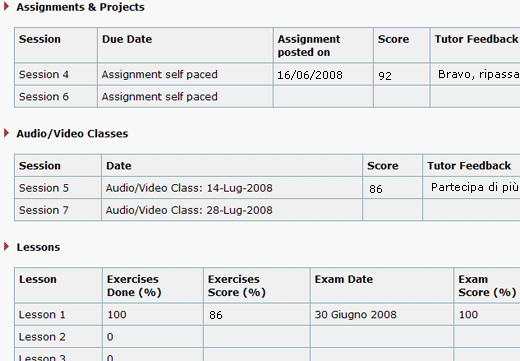
Depending on the course in which you are registered, the page may look approximately like this:
Please note:
1. in the Lessons area, Column 2 shows the percentage of exercises completed, Column 3 reports the average score of the completed exercises.
2. Check marks for completed activity are applied automatically as soon as the student completes 100% of his exercises and gets more than 60 as a grade (he can do the exercises again to improve his score), or as soon as a student completes an exam.
YES.
CyberItalian online registration transaction is secure and encrypted (see full key or lock at the bottom of the registration page plus the SSL Web Server Certification).
The information you provide are confidential and unavailable to third parties.
Privacy Policy: CyberItalian is strongly committed to protecting the privacy of its Users. Throughout cyberspace, CyberItalian wants to contribute to provide a pleasant and safe environment for consumers. CyberItalian does not disclose information that you may give us, such as your name, address, email address, or telephone number, to any third parties. See our registration form here
You can pay with PayPal. See our registration form here
If you have never studied Italian (even if you understand it a little or you used to speak it as a child), you should start with a beginner course. Otherwise take a Placement Test now.
Compare here our learning itineraries (courses and programs).
YES! Check here for more information.
YES!
Your purchase is backed by a 100% satisfaction guarantee*. We want you to be happy with our work. We've put a lot of work into creating what we feel is the easiest-to-use Italian language learning method online. We're proud of what we do, and we work hard to make you happy. We know that CyberItalian method delivers results and will help you learn Italian. However, if you decide within 30 days of purchase that CyberItalian is not right for you, we’ll refund 100% of your money for the self-study course, and 100% of your money for the package of private lessons or tutored courses (standard, intensive or extended) minus the cost of any private or tutored class that you might have already completed. *Please note: the refund policy for our courses for schools is different and can be discussed during or before registration.
You can buy with complete peace-of-mind!
YES! Click here.
Problems with the access to the site may be due to:
- a temporary failure of the lines or connection (in this case try again later)
- an incorrect insertion of username and password. Keep in mind that username and password are CASE SENSITIVE and you have to enter them exactly as you entered them in the registration form (paying attention to capital letters!)
If you receive a server error clear the cookies on your browser and try again.
If you are using an iPhone or iPad and cannot log in or receive a server error:
- close all browser windows, in particular the CyberItalian one
- go to iPhone or iPad Settings (from home screen)
- select your browser (please make sure you are not using Safari but Chrome or Firefox)
- clear History AND clear Cookies
- open your browser again, go to CyberItalian and log in
If the problem continues, please use the Contact Us form on the left (select technical support) and send a detailed report of the problem you are experiencing, along with your browser and system type.
Select LOG IN and 'Forgot Password?'. Data will be sent automatically to your e-mail (the one you inserted in the CyberItalian form when you registered).
Problems with the online registration may be due to:
- incompatibility between your browser and our encrypted registration form (in this case, if you can, try using a different computer or select Contact Us in the menu to the left.)
- busy lines or connections (if lines or connections are slow or busy, the payment transaction may be discontinued and the registration canceled. In this case, please try to register later).
The Internet requires some patience at times! If you still cannot register online, contact us. Before you register with us, make sure you can use CyberItalian with your computer system: TAKE a FREE TRIAL lessons now.
- Basic requirements
To enjoy CyberItalian you need a computer or smartphone with Internet access. Minimum Internet connection speed required to access the site is 56K. Broadband recommended.
CyberItalian can be used with most browsers (Chrome, Firefox, Microsoft Edge, Opera) on Windows, Mac, Linux, Android and IOS.
We suggest you TURN OFF the auto-translate feature for Italian language.
CyberItalian can be used also on smartphones (iPhone or any Android phone).
On smartphones we suggest you switch off auto-correct and predictive check spelling when entering Italian text in the exercise fields.
CyberItalian make use of pop-ups to facilitate the learning process: make sure you do NOT block ALL pop-ups. You should keep the default setting for your browser that blocks ONLY UNWANTED pop-ups. To check and eventually modify your browser settings, open the browser help or guide and search for popup or pop-up.
To make use of the Recording and Pronunciation tools, please make sure your headset or microphone and speakers are plugged into your computer.
See more info about listening to the audio
See more info about the pronunciation guides and voice recording
- To participate in the Audio-Video group classes
The following are the minimum system requirements needed to attend the Audio-Video classes in our Tutored Courses.
For Windows Systems:
- Windows 7 or later
- Google Chrome, Windows Edge or Firefox
For Mac Systems:
- Any Mac OS
- Google Chrome or Firefox
For All Systems:
- Fast Internet connection
- Headset/Microphone combination
- A Skype access and Name (Skype is downloadable* for FREE from the website Skype.com)
- The webcam is optional
IMPORTANT:
- To get the most out of your AV class, you need a headset with microphone, so you can hear well and you can be heard well.
If you use a microphone embedded in your computer make sure it works well and you are in a quiet room with no background noises in order not to disturb the class. - During the class, the teacher might use a cobrowsing system to show the educational materials. In this case the teacher will post a link in the Skype text chat. Please click on the link to open the educational material in your browser. This means that you will have to have both the Skype window and your browser window open. Please: close all other programs you may have opened in your computer in order to minimize conflict. A wider computer screen might help in switching between the Skype window and the browser window, or in keeping them open side by side. If you are using a tablet or phone you might have some difficulties switching from the Skype window to the browser window. If you can, please use a wider screen.
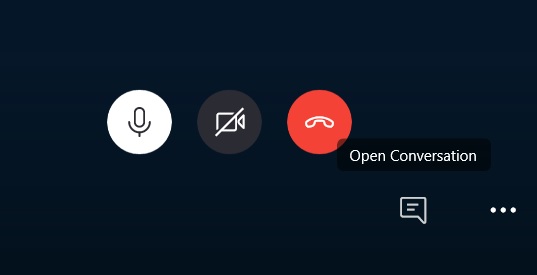
Please open the Skype text chat by clicking on the text icon (square with three lines - see image below.) Depending on your Skype version, the text chat button might appear in a different position. Teacher and students might use the text window on Skype also to write corrections, questions, etc.
Need help about Skype? See here
*Downloading a software is pretty easy. However, if you are not familiar with computers and the Internet, find someone, (a relative or a friend), who can help you in setting your computer and browser properly! Please note: CyberItalian is not responsible for the location, downloading, usage and properties of the recommended softwares.
- To participate in the 1to1 Private Lessons
The following are the minimum system requirements needed to attend the 1to1 Private Lessons.
For Windows Systems:
- Windows 7 or later
- Google Chrome, Windows Edge or Firefox
For Mac Systems:
- Any Mac OS
- Google Chrome or Firefox
For All Systems:
- Broadband Internet connection
- Headset/Microphone combination
- A Skype access and username (Skype is downloadable* for FREE from the website Skype.com)
- The webcam is optional
Need help about Skype? See here
*Downloading a software is pretty easy. However, if you are not familiar with computers and the Internet, find someone, (a relative or a friend), who can help you in setting your computer and browser properly! Please note: CyberItalian is not responsible for the location, downloading, usage and properties of the recommended softwares.
On CyberItalian you find 3 types of audio:
The first type, that you can find in the Alphabet page and in some of the activities, requires you to click on a drawing or word so the audio will start (listening practice).
The second type, that you can find in all lessons and in some of the activities, requires you to click on the "play" button of an audio box which offers a slow speed audio and a normal speed audio (listening practice with two different audio speeds).
Regulate the volume, replay and pause the audio as you wish. You can slow-down the audio by clicking on the little snail while the audio is playing.
Try this audio here and learn the Italian numbers: uno 1, due 2, tre 3, quattro 4, cinque 5, sei 6, sette 7, otto 8, nove 9, dieci 10, undici 11, dodici 12, tredici 13, quattordici 14, quindici 15, sedici 16, diciassette 17, diciotto 18, diciannove 19, venti 20, ventuno 21
The third type, that you can find in all lessons and in some of the activities, requires you to open the Pronunciation Guides: Maria and Franco. In the Guides window, you also find a tool to record and check your own pronunciation (listening practice, pronouncing and evaluating your own pronunciation).
To listen to our MP3 audio files, your browser needs to be audio enabled.
Note:
The first and second type of audios are compatible with all devices, Windows, Mac, iPhones, iPads, Android tablets and mobiles, Smart phones and other new devices.
The full version of the pronunciation guides is available only for the Chrome browser on Windows desktops and notebooks and Android tablets and mobiles.
A limited version (with no speech recognition nor evaluation) is available on Firefox, Edge and Opera browsers. If possible, please use Chrome.
If you are taking a Tutored Course, you can participate in the audio-video group classes on Skype.
Find here the technical requirements.
You will find instructions on how to join the classes in your online sessions.
The classes are divided by level (yellow = beginner, green = intermediate, light blue = advanced).
You can participate in all audio-video group classes of your level, unless the teacher recommends otherwise (the teacher could ask a student to change level if they need to reinforce their comprehension and speaking skills or if they need to be in a faster paced class).
Find here the class schedule. Please note, the Calendar reports your local time in 24 hours (provided that your computer is set on your local time). For example, the beginner class on Saturday is at 16 (4 pm) Italian time. If you need to calculate the time in your zone click here.
Classes last 50 minutes.
In the audio-video class students and teacher discuss various subjects. Some of the subjects are proposed by the teacher and the educational material is available via a co-browsing system. Other subjects are proposed by the students, and others spring up spontaneously during the class.
Participants receive corrections and explanations when necessary. Questions, interesting facts and any other discussion material are welcome.
As a pre-listening and pre-speaking exercise before the class, please prepare one or two Italian sentences you would like to say (to form the sentences you can use the educational material you have completed so far).
Please note: participation in the AV classes is optional. We do not record the AV classes because we found out during the years that students prefer not to be recorded. Some of them are very shy about their Italian pronunciation/speaking/understanding skills. These are delicate psychological aspects; we want to provide students with a comfortable place to practice their Italian skills, without the feeling that they will be recorded.
On CyberItalian you have 2 ways to record your voice and check your pronunciation:
- Registratore.
Inside the self-study lessons (on the right menu) and in the Dialogo page you find the link to "Registratore" . Click on the link and open the recording window, click on "recording", speak, click "stop" and then "play" to listen to your recording. Listen to the audio files provided in the CyberItalian dialogue and compare your recording to the CyberItalian audio file.
PLEASE NOTE:
The Registratore is available for the Chrome, Firefox, Edge and Opera browser on Windows and Android desktops and notebooks, tablets and mobiles.
- Pronunciation Guides.
Inside the self-study lessons (on the right menu) and in several activities you find the link to "Pronuncia" or "Pronunciation Guides".
When you click on the "Pronuncia" window (on the menu in each Lesson) you will see the following window (please allow the download time).
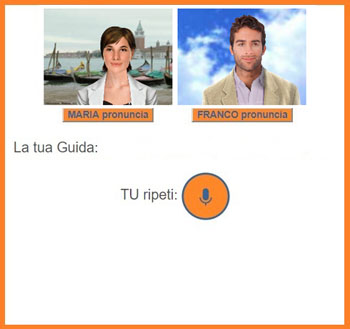
Select (double click on a word or left click, hold down and drag the mouse-pointer over to select a sentence) any word or sentence in the lesson page. Click on "Maria pronuncia" or "Franco pronuncia" to listen to the selected text.
If you select a long text, the pronunciation guides will crop it to the first period, question mark or exclamation point. This is because it is better to practice the pronunciation on single words or short sentences.
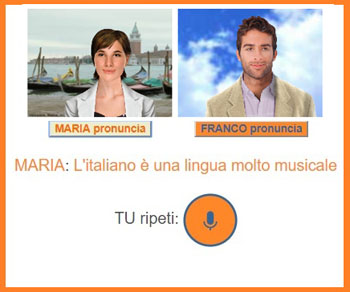
At this point use the recording button to record your voice and evaluate the quality of your pronunciation. Once you stop the recording, your pronunciation and evaluation will appear on the screen.
Please note: this evaluation is only a reference for yourself to improve your pronunciation. It is not a score and it will not be reported in your Progress Report.
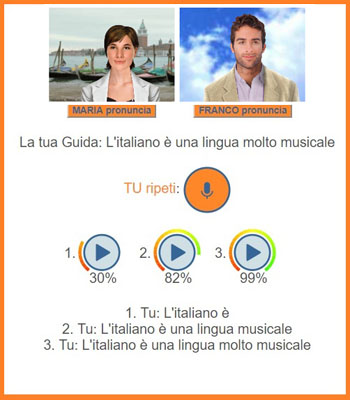
You have up to 3 possibilities of recording and evaluating in the same window. The fourth evaluation will erase the first one.
IMPORTANT:
The orange button "pronuncia" will appear in the page each time you make a selection (double click on a word or left click, hold down and drag the mouse-pointer over to select a sentence). You can make several selections, then click on each "pronuncia" button and have Maria or Franco pronounce each word/sentence. When you select a text to listen to its pronunciation, make sure the Pronunciation Guide window is open, otherwise nothing will happen. Every time you change page in the lesson you need to open again the Pronunciation Guide window. The link to the Pronunciation Guides is always available in the lesson menu.
PLEASE NOTE:
The full version of the pronunciation guides is available for the Chrome browser on Windows desktops and notebooks and Android tablets and mobiles.
A limited version (with no speech recognition nor evaluation) is available on Firefox, Edge and Opera browsers. If possible, please use Chrome.
While using the pronunciation guides you might get the following automatic messages
- if you use a browser different from Chrome: "Your browser can only record your voice but does not provide a score. Please use Chrome"
- if you are using iPhone or iPad: "no web audio supported in your browser"
- if you do not speak clearly: "I did not understand, please record again"
- if your connection is slow or momentarily unavailable: "Occasional error messages may depend on the Internet connection"
On mobiles or smartphones you can select with your finger any word or sentence in the page and the pronunciation guides will open automatically.
On small screens (not mobiles or smartphones) open the pronunciation guides from the three-lines menu available in the upper right corner.
When you do the exercises in our Lessons, for certain words you need to use the Italian accented characters, otherwise the system cannot recognize your answer as correct.
Here are the Italian accented characters: "à, è, ì, ò, ù" (as in: caffè, università, più, etc.) or "é" (as in: perché).
English keyboards are different from Italian keyboards, and do no show the keys with the Italian accented vowels.
To write Italian accents use one of the following options.
Windows users - Option 1 - ALT key + numeric codes: in Windows, combinations of the ALT key plus a numeric code can be used to type a non-English character (accented letter) in any Windows application. IMPORTANT: press Num Lock before using the Alt method for typing accented characters. In this way the keys of the numeric keypad are interpreted only as numbers.
Example: To input the grave e è (138), hold down the ALT key, type 138 on the numeric keypad, then release the ALT key.
| Accent | A | E | E | I | O | U |
|---|---|---|---|---|---|---|
| Grave (Cap) |
À 0192 |
È 0200 |
É 0201 |
Ì 0204 |
Ò 0210 |
Ù 0217 |
| Grave (Lower) | à 133 |
è 138 |
é 130 |
ì 141 |
ò 149 |
ù 151 |
Windows users - Option 2 - add the International keyboard: in this way you configure the computer so a small transparent window sits in the task bar that allows you to switch back and forth between the English and International keyboard. When you want to use accented letters just switch to the International keyboard. Then, if you want to type an accented letter you press the appropriate accent key and then the letter.
For example:
` + e = è
Similarly,
' + e = é
See instructions for adding the International keyboard. You can just leave the International keyboard on all the time. It will create some minor nuisances when you type certain punctuation marks. For example, in order to type [ ' ] you press [ ' ] then spacebar.
Mac users - OPTION key: when you want to add a letter with a symbol in just about any Mac OS X application, hold down the Option key and press the appropriate symbol key. Release the keys and type the letter you want to receive the symbol. Take "perché" — you type p, e, r, c, h, then press Option-E (to get the right-leaning acute accent), then e. As in most of these combinations, the acute accent key command is linked to the letter most likely to need the symbol in question — in this case, the letter e. But if you need to type the Italian limóne, say, you press Option-E, then o.
The left-leaning (grave) accent is simple to remember, because it has its own key: the ` above the Tab key. Just press Option-`and then the target letter: "Eccola là"!
Need to type a capital letter with an accent? Just press Option plus the appropriate key for your symbol, then press Shift as you type the letter you want. For example, to type Évian-les-Bains, use Option-E followed by a capital E.
Editor for Italian characters: if you don't like any of the above solutions you can try this editor for Italian accented characters.
or
Copy and paste from here: you can go back to the oldest and simplest method and copy the Italian accented vowels
from here or from our lessons, and then paste them in the exercise field:
à, è. ì, ò, ù, é. À, È, Ì, Ò, Ù, É.
TESTIMONIAL (more...):